Skip to content

Browser Client

As a demonstration of a typical browser single-page app "frontend" connection to a RESTful JSONAPI backend, we'll build a simple client using Angular.

Which Angular Packages?

There are multiple Angular packages to choose from for both the API and OAuth2/OIDC access. Here's a summary of some I've looked at as of 2024-11-22:

Purpose Package ng version status details
JSONAPI client angular2-jsonapi 8?? orphaned Converts JSONAPI models to Angular models. Is currently used by some CUIT applications.
JSONAPI client @michalkotas/angular2-jsonapi 18 active fork of above
JSONAPI client ngx-jsonapi 15 ? Includes some caching, etc.
JSONAPI client jsona all popular Tiny and simple JSON:API serializer / deserializer. Pending replacement for CUIT applications.
OpenAPI client code generator @openapitools/openapi-generator-cli 18 popular nodejs CLI for openapi-generator. Reads an OAS 3.x schema document and generates ng models and services.
OAuth2/OIDC client angular-oauth2-oidc 16 popular An OpenID Connect client library. Currently used by some CUIT applications.
OAuth2/OIDC client angular-auth-oidc-client 18 popular An OpenID Connect client library.

Note

I am not a Typescript or Angular developer. This example code is based on ChatGPT-generated code (usually wrong on the first dozen tries), copying examples, reading the docs, and a little help from an actual Angular developer. Feel free to submit PRs to fix the code!

For this demo, I've selected @openapitools/openapi-generator-cli which does a really great job of generating Angular models and services based on the OAS 3.x schema generated by spectacular.

See this tutorial.

Let's get started. Jump ahead to see the "finished" code here.

Start with a new app module.

In ng 18+ you have to explicitly say you want an app.module:

1
ng new --standalone false oas-angular-app

Install the openapi-generator-cli:

1
npm i @openapitools/openapi-generator-cli -D

Note that openapi-generator is a Java app so you may have to install and/or upgrade your JRE.

Here's how I did it for MacOS:

1
2
3
4
5
6
brew tap AdoptOpenJDK/openjdk
brew install --cask adoptopenjdk11
export JAVA_HOME=`/usr/libexec/java_home -v 1.11`
java -version
openjdk version "11.0.11" 2021-04-20
OpenJDK Runtime Environment AdoptOpenJDK-11.0.11+9 (build 11.0.11+9)

Add a build script to run openapi-generator. Add this to package.json:

 1
 2
 3
 4
 5
 6
 7
 8
 9
10
11
12
diff --git a/frontend/oas-angular-app/package.json b/frontend/oas-angular-app/package.json
index 7b76dd3..9aaa370 100644
--- a/frontend/oas-angular-app/package.json
+++ b/frontend/oas-angular-app/package.json
@@ -6,7 +6,9 @@
     "start": "ng serve",
     "build": "ng build",
     "watch": "ng build --watch --configuration development",
-    "test": "ng test"
+    "test": "ng test",
+    "generate:api": "openapi-generator-cli generate -p=removeOperationIdPrefix=true -p=useSingleRequestParameter=true -i ../../docs/schemas/openapi.yaml -g typescript-angular -o src/app/core/api/v1"
   },

Generate the API client code

1
npm run generate:api

This creates a file tree containing models and services:

 1
 2
 3
 4
 5
 6
 7
 8
 9
10
11
12
13
14
15
16
17
18
19
20
21
22
23
24
25
26
27
28
29
30
31
32
33
34
35
frontend/oas-angular-app/src/app/core/
└── api
    └── v1
        ├── README.md
        ├── api
        │   ├── api.ts
        │   ├── courseTerms.service.ts
        │   ├── courses.service.ts
        │   ├── grades.service.ts
        │   └── ...
        ├── api.module.ts
        ├── configuration.ts
        ├── encoder.ts
        ├── git_push.sh
        ├── index.ts
        ├── model
        │   ├── course.ts
        │   ├── courseAttributes.ts
        │   ├── courseRelationships.ts
        │   ├── courseRequest.ts
        │   ├── courseRequestData.ts
        │   ├── courseRequestDataAttributes.ts
        │   ├── courseResponse.ts
        │   ├── courseTerm.ts
        │   ├── ...
        │   ├── paginatedCourseList.ts
        │   └── ...
        │   ├── patchedCourseRequest.ts
        │   ├── patchedCourseRequestData.ts
        │   └── ...
        ├── param.ts
        └── variables.ts

...
5 directories, 107 files

Make some components

1
2
3
4
mkdir src/app/components
cd src/app/components
ng generate component CourseList
ng generate component CourseDetail

Here's a very basic example:

 1
 2
 3
 4
 5
 6
 7
 8
 9
10
11
12
13
14
15
16
17
18
19
20
21
22
23
24
// app/components/course-list/course-list.component.ts
import { Component, OnInit } from '@angular/core';
import { CoursesService, Course } from '../../core/api/v1';

@Component({
  selector: 'app-course-list',
  templateUrl: './course-list.component.html',
  styleUrl: './course-list.component.css'
})
export class CourseListComponent implements OnInit {
  courses: any;

  constructor(private coursesService: CoursesService) {}

  ngOnInit() {
    this.coursesService.coursesList().subscribe(
      (courses) => {
        this.courses = courses;
        console.log(this.courses)
      },
      (error) => console.error('Error:', error)
    );
  }
}

Unlike the JSONAPI-specific packages, this one doesn't know the details of a JSONAPI.org spec so you need to drill down into the response a bit as in this example. The good news is all the necessary models were created based on the OAS schema document.

 1
 2
 3
 4
 5
 6
 7
 8
 9
10
11
12
13
14
<!-- app/components/course-list/course-list.component.html -->
<h2>Course List</h2>
<div *ngIf="courses">
  Page &#123;&#123; courses.meta.pagination.page &#125;&#125; (length &#123;&#123;courses.data.length &#125;&#125;) of &#123;&#123; courses.meta.pagination.pages &#125;&#125;
  <ul>
    <li *ngFor="let course of courses.data">
      <a [routerLink]="['/courses', course.id]">&#123;&#123; course.attributes.course_identifier &#125;&#125;</a>:
      &#123;&#123; course.attributes.course_name &#125;&#125;
    </li>
  </ul>
</div>
<div *ngIf="!courses">
  <p>Loading...</p>
</div>

Add OAuth2/OIDC

Per the Quickstart we can use the configuration wizard to do intial setup:

 1
 2
 3
 4
 5
 6
 7
 8
 9
10
11
12
13
14
15
16
17
18
19
20
21
22
23
24
25
oas-angular-app$ ng add angular-auth-oidc-client

✔ Determining Package Manager
  › Using package manager: npm
✔ Searching for compatible package version
  › Found compatible package version: angular-auth-oidc-client@18.0.2.
✔ Loading package information from registry
✔ Confirming installation
✔ Installing package
? What flow to use? OIDC Code Flow PKCE using refresh tokens
? Please enter your authority URL or Azure tenant id or Http config URL http://localhost:8000/o/.well-known/openid-configuration/
    🔎 Running checks...
    ✅️ Project found, working with 'oas-angular-app'
    ✅️ Added "angular-auth-oidc-client" 18.0.2
    🔍 Installing packages...
    ✅️ Installed
    ✅️ 'src/app/auth/auth-config.module.ts' will be created
    ✅️ 'AuthConfigModule' is imported in 'src/app/app.module.ts'
    ✅️ All imports done, please add the 'RouterModule' as well if you don't have it imported yet.
    ✅️ No silent-renew entry in assets array needed
    ✅️ No 'silent-renew.html' needed
CREATE src/app/auth/auth-config.module.ts (753 bytes)
UPDATE package.json (1311 bytes)
UPDATE src/app/app.module.ts (1153 bytes)
✔ Packages installed successfully.

Then edit src/app/auth/auth-config.module.ts to fill in the ClientId, Scopes, etc.

Note

Because this library implements OAuth2 best practices, there is no ClientSecret. Change the existing OAuth2 AS setup to remove the secret if you currently have one.

Follow the Code flow PKCE auto-login example (found in the samples library to get things working.

Here's an example config:

 1
 2
 3
 4
 5
 6
 7
 8
 9
10
11
12
13
14
15
16
17
18
19
20
21
22
23
// src/app/auth/auth-config.ts

import { NgModule } from '@angular/core';
import { AuthModule } from 'angular-auth-oidc-client';


@NgModule({
  imports: [AuthModule.forRoot({
    config: {
      authority: 'http://localhost:8000/o/.well-known/openid-configuration/',
      redirectUrl: window.location.origin,
      postLogoutRedirectUri: window.location.origin,
      clientId: 'demo_djt_web_client',
      scope: 'openid profile email read auth-columbia demo-djt-sla-bronze https://api.columbia.edu/scope/group',
      responseType: 'code',
      silentRenew: true,
      useRefreshToken: true,
      renewTimeBeforeTokenExpiresInSeconds: 30,
    }
  })],
  exports: [AuthModule],
})
export class AuthConfigModule {}

Make the various routes visible only when logged in by adding

1
canActivate: [AutoLoginPartialRoutesGuard]
to each route.

Most importantly, make sure the OAuth2 token not only determines if routes are visible but is also passed to the backend API via the Authorization header by adding something like this to the top-level app.module. This glues the OIDC service and the generated API together.

 1
 2
 3
 4
 5
 6
 7
 8
 9
10
11
12
13
14
15
16
17
18
19
20
21
22
23
24
25
26
27
28
29
import { ApiModule, Configuration, ConfigurationParameters } from './core/api/v1';
import { OidcSecurityService } from 'angular-auth-oidc-client';
// ...

export function apiConfigFactory(): Configuration {
  const oidcSecurityService = inject(OidcSecurityService);
  var conf: any = null; // I'm sure this is not the right way to do this.
  oidcSecurityService.getAccessToken().subscribe((token) => {
    conf = new Configuration({
      basePath: "http://localhost:8000",
      credentials: {'oauth2': token}
    });
  });
  return conf;
}
@NgModule({
    declarations: [
        AppComponent,
        // ...
    ],
    imports: [
        CommonModule,
        BrowserModule,
        AppRoutingModule,
        ApiModule.forRoot(apiConfigFactory),
        HttpClientModule,
        AuthConfigModule,
    ], // ...
})

Note

The sort query parameter will not show up unless you add ordering_fields to the view definitions. See https://github.com/jokiefer/drf-spectacular-json-api/discussions/28

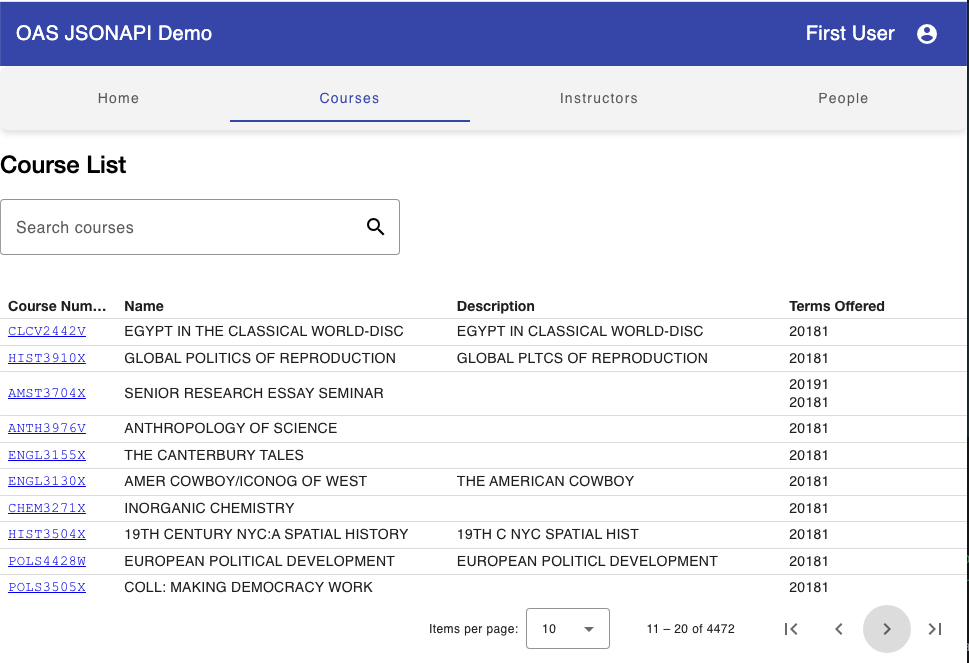
A More Complete Example

See the current source code for a somewhat complete (still in process) example of the app in action. OAS app screenshot