See http://jsonapi.org/ for their
propaganda. The spec provides consistent rules for how requests and
responses are formatted, is truly RESTful, and implements HATEOAS.
Any standard is better than none and this one seems pretty good.
{json:api} implements most everything you would want and then some while
being relatively straightforward. It supports the ORM
by representing not just the primary entity but relationships to other entities. See
CU's JSON API Architecture Pattern
and the example DJA app which we explore below.
{json:api} is a "special flavor" of JSON and has an
IANA-registered MIME-type
which specifies that the
JSON request and response bodies are formatted a specific way. By using
these headers you tell the other party what you're sending or willing to
accept as a response:
Content-type: application/vnd.api+json
Accepts: application/vnd.api+json
Even if you don't know about this media type, the "+json" on the end
(structured syntax name suffix)
says it's fundamentally JSON-serialized so, even if you don't know what
vnd.api is, a JSON parser will still be able to read it.
You may want to take a look at the {json:api} response
schema which is written in
JSON using the JSON-schema.org
notation (although the text description is easier to
understand).
The main {json:api} concept is that it manipulates a collection of
objects. Each resource item always has a type and id along with
attributes. Optional relationships show how this object relates to
others, which themselves are identified by their type and unique id. These can
be "to one" or "to many" relationships, with the latter represented in
JSON with an array.
{json:api} uses URLs extensively to facilitate navigation through a
resource collection, individual resource, related objects, pages of a
multi-page response and so on.
When a related object is referenced in a {json:api} response, it is
identified by the type and id. This is a compact representation
which is especially helpful in a to-many relationship.
To avoid extra HTTP requests, {json:api} optionally allows the client to
request that the full values of the related resources be included in the
same response. This is triggered using the include query parameter.
Since a resource collection may include thousands or millions of items,
you don't want to GET the entire collection in one HTTP transaction.
Pagination uses the page[number], page[size], query parameters
to specify a starting page and number of items per page (or a
page[offset] and page[limit]). Because this is HATEOAS, page
navigation links (first, last, prev, next) are included in the
response.
(FYI - If you run the sample app and click on any of these sample URLs, they will open in your
browser using DRF's Browseable API.
Enter admin for the user and admin123 for the password.)
Filtering allows selecting only the items that match with the
Filter[fieldname] query parameter; a list of values is typically ORed and
multiple Filters are ANDed. Note that the {json:api} specification only
says the filter parameter is reserved but we've chosen to follow the
recommended convention. For example:
Finally, since a resource may have dozens or hundreds of attributes, perhaps you only
want to see a few of them. This is requested using the
fields[type]=fieldname1,fieldname2,... query parameter.
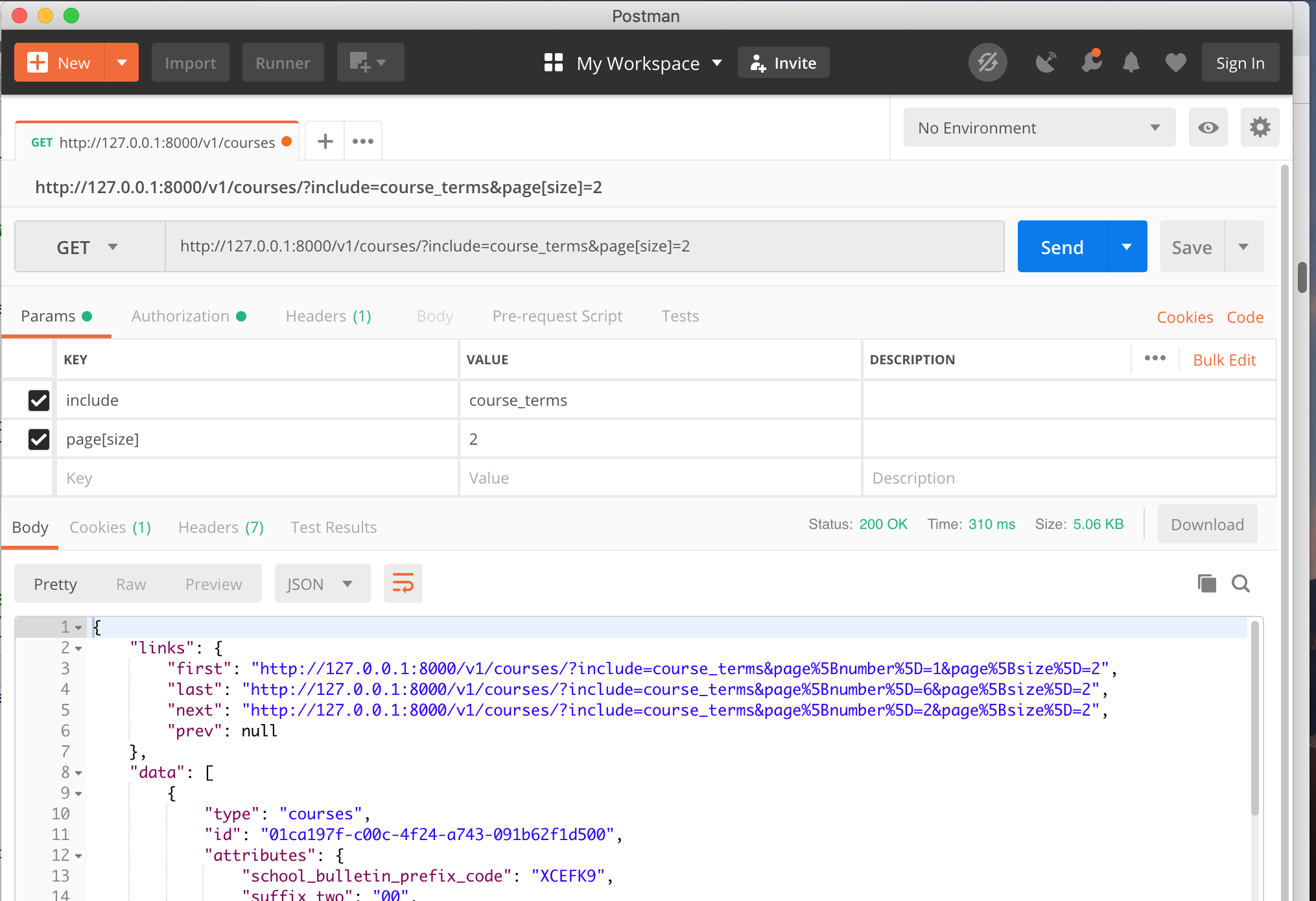
Postman is a powerful tool for testing HTTP. We'll be using it extensively to test our APIs.
If you don't already have it, install Postman. You can get it at
https://www.getpostman.com/.
For the record, here's an example of a GET of the first page of the courses collection, paginated with two
courses per page and with the referenced course_terms related data included in the compound document, avoiding
the need for subsequent HTTP requests to get that information.
{"links":{"first":"http://127.0.0.1:8000/v1/courses/?include=course_terms&page%5Bnumber%5D=1&page%5Bsize%5D=2","last":"http://127.0.0.1:8000/v1/courses/?include=course_terms&page%5Bnumber%5D=5&page%5Bsize%5D=2","next":"http://127.0.0.1:8000/v1/courses/?include=course_terms&page%5Bnumber%5D=2&page%5Bsize%5D=2","prev":null},"data":[{"type":"courses","id":"01ca197f-c00c-4f24-a743-091b62f1d500","attributes":{"school_bulletin_prefix_code":"XCEFK9","suffix_two":"00","subject_area_code":"AMSB","course_number":"00373","course_identifier":"AMST3704X","course_name":"SENIOR RESEARCH ESSAY SEMINAR","course_description":"SENIOR RESEARCH ESSAY SEMINAR","effective_start_date":null,"effective_end_date":null,"last_mod_user_name":"loader","last_mod_date":"2018-08-03"},"relationships":{"course_terms":{"meta":{"count":2},"data":[{"type":"course_terms","id":"f9aa1a51-bf3b-45cf-b1cc-34ce47ca9913"},{"type":"course_terms","id":"01163a94-fc8f-47fe-bb4a-5407ad1a35fe"}],"links":{"self":"http://127.0.0.1:8000/v1/courses/01ca197f-c00c-4f24-a743-091b62f1d500/relationships/course_terms","related":"http://127.0.0.1:8000/v1/courses/01ca197f-c00c-4f24-a743-091b62f1d500/course_terms/"}}},"links":{"self":"http://127.0.0.1:8000/v1/courses/01ca197f-c00c-4f24-a743-091b62f1d500/"}},{"type":"courses","id":"001b55e0-9a60-4386-98c7-4c856bb840b4","attributes":{"school_bulletin_prefix_code":"XCEFK9","suffix_two":"00","subject_area_code":"ANTB","course_number":"04961","course_identifier":"ANTH3160V","course_name":"THE BODY AND SOCIETY","course_description":"THE BODY AND SOCIETY","effective_start_date":null,"effective_end_date":null,"last_mod_user_name":"loader","last_mod_date":"2018-08-03"},"relationships":{"course_terms":{"meta":{"count":2},"data":[{"type":"course_terms","id":"243e2b9c-a3c6-4d40-9b9a-2750d6c03250"},{"type":"course_terms","id":"00290ba0-ebae-44c0-9f4b-58a5f27240ed"}],"links":{"self":"http://127.0.0.1:8000/v1/courses/001b55e0-9a60-4386-98c7-4c856bb840b4/relationships/course_terms","related":"http://127.0.0.1:8000/v1/courses/001b55e0-9a60-4386-98c7-4c856bb840b4/course_terms/"}}},"links":{"self":"http://127.0.0.1:8000/v1/courses/001b55e0-9a60-4386-98c7-4c856bb840b4/"}}],"included":[{"type":"course_terms","id":"00290ba0-ebae-44c0-9f4b-58a5f27240ed","attributes":{"term_identifier":"20191","audit_permitted_code":0,"exam_credit_flag":false,"effective_start_date":null,"effective_end_date":null,"last_mod_user_name":"loader","last_mod_date":"2018-08-03"},"relationships":{"course":{"links":{"self":"http://127.0.0.1:8000/v1/course_terms/00290ba0-ebae-44c0-9f4b-58a5f27240ed/relationships/course","related":"http://127.0.0.1:8000/v1/course_terms/00290ba0-ebae-44c0-9f4b-58a5f27240ed/course/"},"data":{"type":"courses","id":"001b55e0-9a60-4386-98c7-4c856bb840b4"}}},"links":{"self":"http://127.0.0.1:8000/v1/course_terms/00290ba0-ebae-44c0-9f4b-58a5f27240ed/"}},{"type":"course_terms","id":"01163a94-fc8f-47fe-bb4a-5407ad1a35fe","attributes":{"term_identifier":"20191","audit_permitted_code":0,"exam_credit_flag":false,"effective_start_date":null,"effective_end_date":null,"last_mod_user_name":"loader","last_mod_date":"2018-08-03"},"relationships":{"course":{"links":{"self":"http://127.0.0.1:8000/v1/course_terms/01163a94-fc8f-47fe-bb4a-5407ad1a35fe/relationships/course","related":"http://127.0.0.1:8000/v1/course_terms/01163a94-fc8f-47fe-bb4a-5407ad1a35fe/course/"},"data":{"type":"courses","id":"01ca197f-c00c-4f24-a743-091b62f1d500"}}},"links":{"self":"http://127.0.0.1:8000/v1/course_terms/01163a94-fc8f-47fe-bb4a-5407ad1a35fe/"}},{"type":"course_terms","id":"243e2b9c-a3c6-4d40-9b9a-2750d6c03250","attributes":{"term_identifier":"20181","audit_permitted_code":0,"exam_credit_flag":false,"effective_start_date":null,"effective_end_date":null,"last_mod_user_name":"loader","last_mod_date":"2018-08-03"},"relationships":{"course":{"links":{"self":"http://127.0.0.1:8000/v1/course_terms/243e2b9c-a3c6-4d40-9b9a-2750d6c03250/relationships/course","related":"http://127.0.0.1:8000/v1/course_terms/243e2b9c-a3c6-4d40-9b9a-2750d6c03250/course/"},"data":{"type":"courses","id":"001b55e0-9a60-4386-98c7-4c856bb840b4"}}},"links":{"self":"http://127.0.0.1:8000/v1/course_terms/243e2b9c-a3c6-4d40-9b9a-2750d6c03250/"}},{"type":"course_terms","id":"f9aa1a51-bf3b-45cf-b1cc-34ce47ca9913","attributes":{"term_identifier":"20181","audit_permitted_code":0,"exam_credit_flag":false,"effective_start_date":null,"effective_end_date":null,"last_mod_user_name":"loader","last_mod_date":"2018-08-03"},"relationships":{"course":{"links":{"self":"http://127.0.0.1:8000/v1/course_terms/f9aa1a51-bf3b-45cf-b1cc-34ce47ca9913/relationships/course","related":"http://127.0.0.1:8000/v1/course_terms/f9aa1a51-bf3b-45cf-b1cc-34ce47ca9913/course/"},"data":{"type":"courses","id":"01ca197f-c00c-4f24-a743-091b62f1d500"}}},"links":{"self":"http://127.0.0.1:8000/v1/course_terms/f9aa1a51-bf3b-45cf-b1cc-34ce47ca9913/"}}],"meta":{"pagination":{"page":1,"pages":5,"count":10}}}
POSTing and PATCHing: Resources and Relationships
While we mostly GET data, every now and then we will need to create
(POST) or update (PATCH) it. A POST creates a new object, so you are
posting to the collection URL. Since we want the system to automatically
assign the new UUID we don't include that in the request body. For
example:
POST http://127.0.0.1:8000/v1/courses/ with a Content-type: application/vnd.api+json header and a
JSON request body containing:
 1
 2
 3
 4
 5
 6
 7
 8
 9
10
11
12
13
14
{"data":{"type":"courses","attributes":{"school_bulletin_prefix_code":"B","suffix_two":"00","subject_area_code":"PHIL","course_number":"9999","course_identifier":"ZENM5001Z","course_name":"Zen and the Art of APIs","course_description":"Establish application harmony through RESTful thinking"}}}
The 201 Created response body will include the newly-assigned id, among other things:
{"data":{"type":"courses","id":"e47eea72-8936-449d-a172-6510f54a0ddb","attributes":{"school_bulletin_prefix_code":"B","suffix_two":"00","subject_area_code":"PHIL","course_number":"9999","course_identifier":"ZENM5001Z","course_name":"Zen and the Art of APIs","course_description":"Establish application harmony through RESTful thinking","effective_start_date":null,"effective_end_date":null,"last_mod_user_name":"admin","last_mod_date":"2018-10-19"},"relationships":{"course_terms":{"meta":{"count":0},"data":[],"links":{"self":"http://127.0.0.1:8000/v1/courses/e47eea72-8936-449d-a172-6510f54a0ddb/relationships/course_terms","related":"http://127.0.0.1:8000/v1/courses/e47eea72-8936-449d-a172-6510f54a0ddb/course_terms/"}}},"links":{"self":"http://127.0.0.1:8000/v1/courses/e47eea72-8936-449d-a172-6510f54a0ddb/"}}}
{json:api} uses PATCH rather than the more common PUT method (which
implies a full replacement) and can update not just the primary resource
but also relationships. A PATCH only replaces the fields that are
provided in the request body. For example, to change the
school_bulletin_prefix_code of a course, you can PATCH with this
Application/vnd.api+json request body: